Productivity Tips · October 20, 2026 · Era
How to Organize Work, Home, and Your Side Business in FOCUS
Managing a full-time job, personal responsibilities, and a side business can leave you feeling pulled in different directions. Learn how to use Capture, Inbox, Areas, Tasks, Today, and Focus Sessions in FOCUS to organize your workload and plan your next steps.

You finish your workday, but your responsibilities aren't finished. There's an errand to run, an invoice to send, a project you want to build, and a few personal tasks you keep putting off. When everything lives in a different place, it can be difficult to figure out what needs your attention first. Let's use FOCUS to bring those responsibilities together and build a plan you can actually work with.
Step 1: Get Everything Out of Your Head
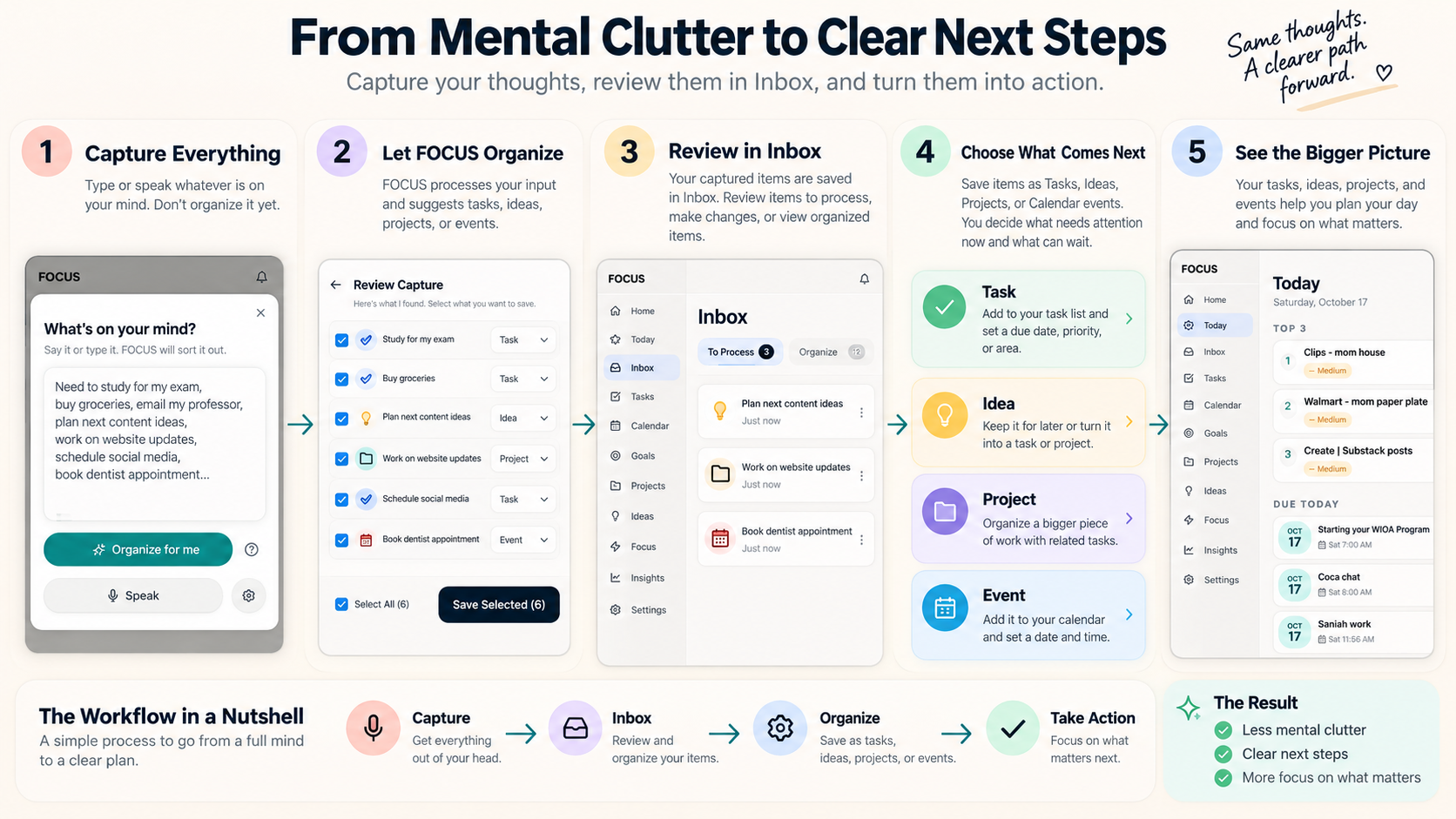
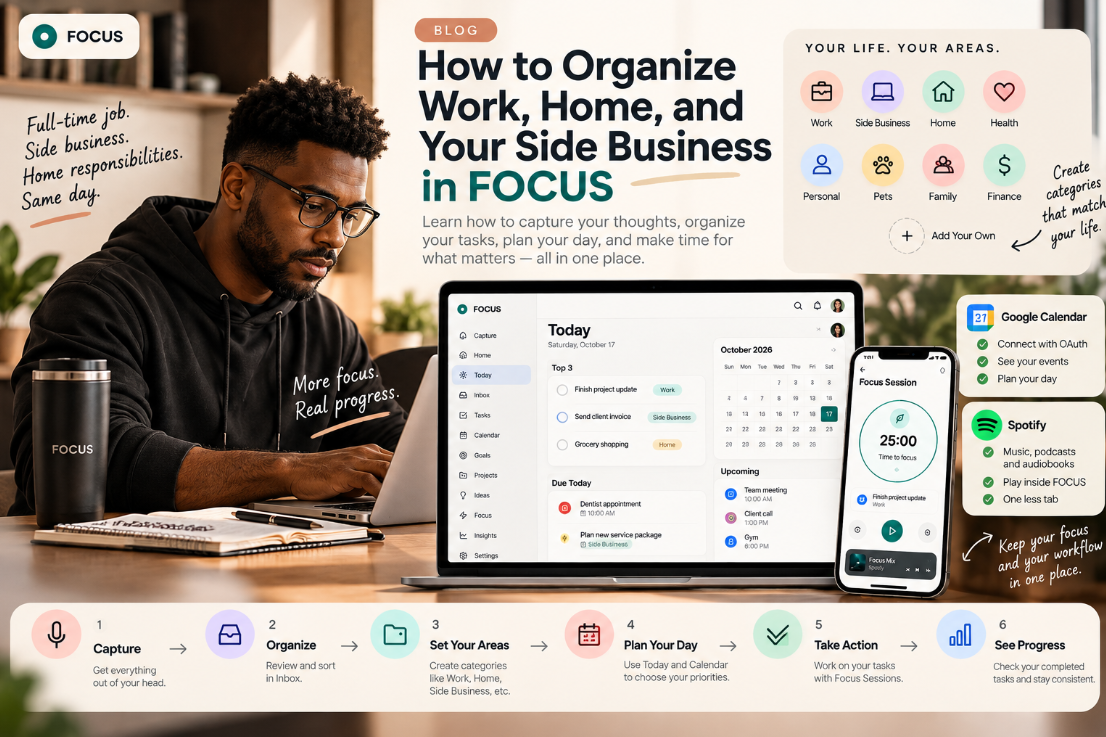
Start in FOCUS by opening Capture. Type or speak the things you need to remember. Don't worry about organizing every item while you're entering it. For example, you might capture: • Finish the project update • Send a client invoice • Pick up groceries • Book a dentist appointment • Develop an idea for a new service Select Organize for me and review the suggestions FOCUS provides. Check the proposed items, make edits when needed, and save the ones you want to keep. Your captured information is also available in Inbox so you can return to it.
Step 2: Organize Your Responsibilities Into Areas
Open Settings and look for Areas. Create categories that reflect the different parts of your life, such as Work, Home, Side Business, and Health. You can add your own Areas instead of relying only on standard categories. Assign relevant tasks to an Area so you can filter and review related responsibilities more easily. For example, your client invoice might belong to Side Business, while your grocery run belongs to Home. Now you have a clearer way to separate your responsibilities without maintaining several unrelated lists.
Step 3: Choose What Deserves Your Attention Today
Open Today. Start with your Top Three priorities, then review the tasks due today and your upcoming commitments. Choose priorities that fit the time you actually have. If your workday is already full, you may only have room for one small side-business task in the evening. That's better than filling your list with more work than you can reasonably complete. Use Calendar to check your schedule and see where your tasks and events fit. If a task belongs to a larger goal or project, keep that connection in mind as you plan.
Step 4: Make Time for One Important Task
When you're ready to work, open Focus and choose a session length that suits the time you have. You can select 15, 25, 45, or 60 minutes. Choose one task before you begin. You might use a session to finish a project update, prepare an invoice, or make progress on your business idea. When the session ends, review what you accomplished. If you need to continue later, return to your Tasks board and adjust the task's status or plan for another session. You don't need to finish an entire project in one sitting.
Put the Workflow Into Practice
You don't have to reorganize your entire life today. Start with Capture, review Inbox, create a few Areas, and choose your Top Three priorities. I've put together a free example guide featuring Jordan, a working professional balancing a job, home responsibilities, and a side business. Use it to follow a sample brain dump, organize tasks and ideas, and build a realistic routine. The examples are a starting point. Replace them with your own responsibilities and adjust the workflow to fit your schedule.
Build a Routine That Works for You
Download Jordan's free workflow guide and follow along as you organize work, home, and business responsibilities.
Download the Free GuideReady to Put Your Plan Into Action?
You've seen how a simple system can help you organize your responsibilities and plan your day. Now, explore FOCUS and build a routine that works for your life, goals, and priorities.
Explore FOCUSTags: FOCUS, task management, time management, entrepreneur, productivity, daily planning